
Product review · Dashboard builders
Chartmat Review: The Dashboard Tool for Google Sheets
Chartmat can turn spreadsheet data into polished dashboards, forms and lightweight web apps. The important question for Amazon sellers is whether flexibility is more valuable than native marketplace automation.
The short answer: Chartmat is potentially useful as a presentation layer for an established Google Sheets workflow. It is a much weaker choice when the real requirement is automated Amazon fee reconciliation, SKU profitability or inventory reporting.
Chartmat is a no-code app and dashboard builder designed around Google Sheets. It can present information that has already been organised in a spreadsheet, but it does not appear to calculate Amazon profit automatically in the way that sellerboard or Shopkeeper does.
That distinction matters. Chartmat can make a spreadsheet easier to understand, edit and share. It cannot make incomplete data accurate. If the underlying Sheet omits storage fees, refunds or advertising spend, the dashboard will display the wrong profit more elegantly.
What this Chartmat review actually covers
The product’s basic workflow is simple: connect a Google Sheet, select the data, assemble a board from visual blocks and share the finished dashboard with colleagues or clients.
Connect
Use Google Sheets as the data layer for a dashboard, report, directory or lightweight internal tool.
Build
Arrange charts, tables, forms, grids, maps and action buttons without building a frontend from scratch.
Share
Publish a board, embed it on a website or provide a controlled view to a team member or client.
Published product materials describe custom dashboards, two-way spreadsheet synchronisation, user permissions, web embeds, custom domains, PDF exports, password protection and integrations through Sheets, Apps Script and Zapier.
Chartmat is best understood as a visual frontend for spreadsheet data. It does not replace the formulas, imports or business rules underneath that data.
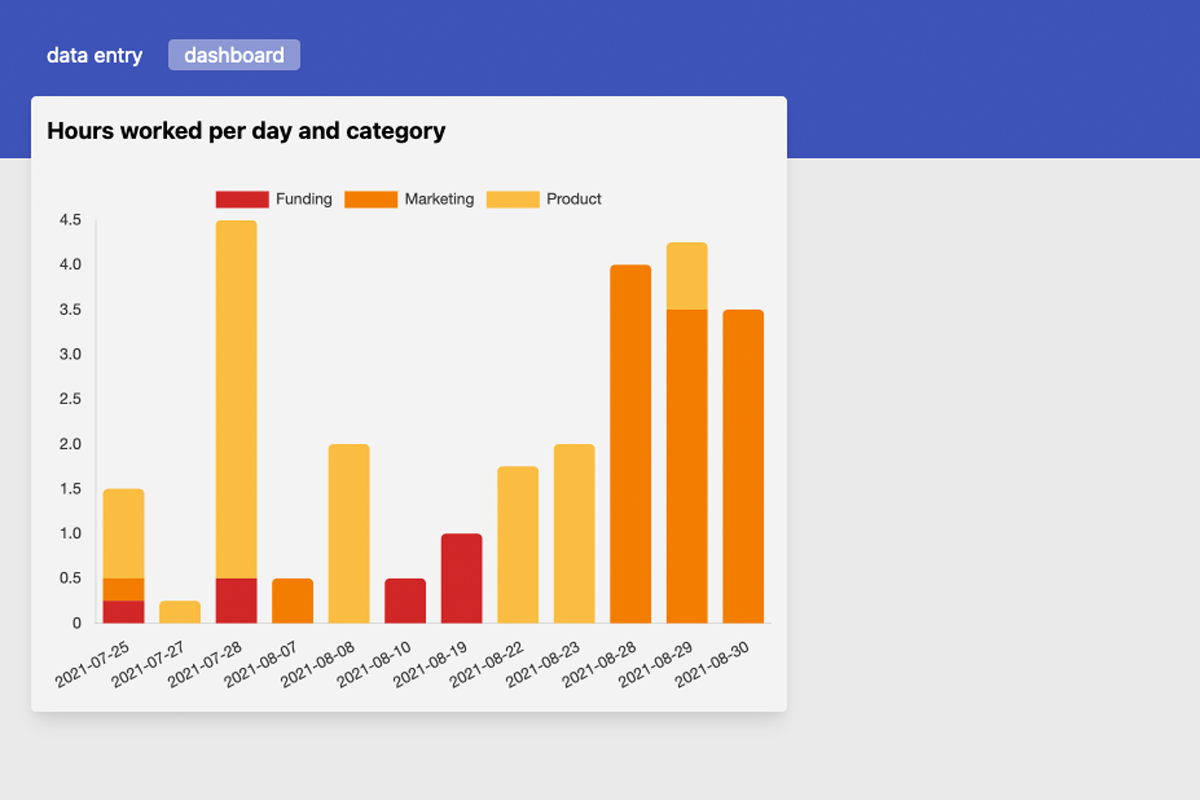
Chartmat product screenshots

What Chartmat can do for an Amazon seller
Chartmat becomes relevant when a seller already has a dependable spreadsheet workflow. Potential applications include:
- A weekly management dashboard combining marketplace exports
- A purchasing planner shared with a sourcing assistant
- A supplier database with searchable forms
- A manual SKU profitability report
- A cash-flow forecast for inventory orders
- A client-facing dashboard built by an Amazon agency
- A customised replenishment tracker
- A combined view of Amazon, Shopify, wholesale and offline sales
We could not find evidence of a current native Amazon Selling Partner API connection. Sellers should therefore expect to move data into Google Sheets through exports, formulas, Apps Script, Zapier or another integration layer.
The numbers
Chartmat pricing and limits
Current pricing is unusually difficult to verify. Capterra and Software Advice list a starting price of $29 per month, a free trial and one flat-rate plan. Capterra says its profile was updated in March 2026.
| Offer | Published price | Reported limits | Current status |
|---|---|---|---|
| Basic subscription | Approximately $29/month | No complete current limit table | Directory listing; live vendor checkout not verified |
| AppSumo Plan 1 | Historical lifetime deal | Unlimited boards and rows, 1 workspace, 5 users | Sold out |
| AppSumo Plan 2 | Historical lifetime deal | Unlimited boards and rows, 3 workspaces, 15 users | Sold out |
| AppSumo Plan 3 | Historical lifetime deal | Unlimited boards and rows, 10 workspaces, unlimited users | Sold out |
Do not make a purchase decision from an old lifetime-deal table. Ask Chartmat to confirm its current price, workspace limits, trial terms, supported integrations, cancellation process, support response time and update schedule in writing.
What users say about Chartmat
The available feedback is positive overall, but the samples are too small and too old to prove long-term reliability.
| Review source | Rating | Sample | Interpretation |
|---|---|---|---|
| Capterra | 4.9/5 | 10 reviews | Strong ease-of-use and value scores, but a very small sample |
| Software Advice | 4.9/5 | 10 reviews | Users liked Google Drive ownership, quick setup and live Sheet updates |
| Trustpilot | 3.5/5 | 5 reviews | Four positive reviews and one serious complaint; feedback is not recent |
Positive reviewers commonly praised fast dashboard creation, Google Sheets as the data source, straightforward sharing and the ability to write information back through forms. The limited negative feedback included a complaint about date formatting, billing and an unanswered support request.
Neither side of this evidence is conclusive. A prospective buyer should test a real workflow and contact support before paying. A useful, timely reply to a technical question is stronger evidence than an old aggregate score.
Who it fits—and who it does not
Chartmat is a reasonable fit if:
- Your operational data already lives in Google Sheets.
- You trust the formulas and imports feeding that Sheet.
- You need a cleaner interface for a team or client.
- Amazon is only one part of a wider reporting workflow.
- You need forms, tables or editable views—not only charts.
- Someone on the team owns the spreadsheet model.
Do not choose it if:
- You want to connect Amazon and immediately see profit.
- You expect automatic fee, VAT or refund reconciliation.
- Your COGS data is incomplete or inconsistently maintained.
- You operate several marketplaces without a data pipeline.
- You require accounting-grade reconciliation.
- Vendor availability and support cannot be confirmed.
For a seller below roughly $10,000 per month in revenue with 1–20 active SKUs, Chartmat may be sufficient when the objective is straightforward reporting and the business already runs on spreadsheets.
Between $10,000 and $50,000 per month, it makes more sense as a secondary reporting layer than as the system calculating profit. Above $50,000 per month, or once a catalogue grows beyond approximately 50–100 active SKUs, the cost and risk of maintaining manual imports usually outweigh a small subscription saving.
These are editorial guidelines, not Chartmat plan limits. Operational complexity is the better measure: ten SKUs across multiple marketplaces can require more reporting work than 100 simple domestic listings.
How Chartmat compares
Chartmat, sellerboard and Shopkeeper can all display business metrics, but they solve fundamentally different problems.
| Capability | Chartmat | sellerboard | Shopkeeper |
|---|---|---|---|
| Primary purpose | Google Sheets dashboards and apps | Amazon profit analytics | Amazon profit and operations analytics |
| Native Amazon connection | No current connector found | Yes | Yes |
| Automatic Amazon fees | No | Yes | Yes |
| Profit by ASIN or SKU | Only if the user supplies the calculation | Included | Included |
| PPC and returns | Requires imported data and custom logic | Included | Included |
| Dashboard flexibility | Very high | Moderate | High |
| Forms and internal apps | Core strength | No | No |
| Entry price | Approximately $29/month, unconfirmed live | $19/month | $20/month |
| Best fit | Spreadsheet-driven teams needing custom views | Value-focused sellers needing profit detail | Sellers wanting a visual operations dashboard |
Browse more products in the Profit Analytics category or use the TrustsMatch comparison page to assess alternatives.
Chartmat vs sellerboard
sellerboard starts at $19 per month, or an effective $15 per month on annual billing. Its Standard plan supports up to 3,000 monthly orders according to the official sellerboard pricing table.
When you need to know what an ASIN earned after marketplace fees, advertising, refunds and cost of goods.
When you already trust your spreadsheet model and want to turn it into a cleaner internal or client-facing application.
For most Amazon sellers seeking profit analytics, sellerboard is the stronger default. Chartmat can complement it when a team wants to combine exported sellerboard data with purchasing, cash flow or non-Amazon information.
Chartmat vs Shopkeeper
Shopkeeper starts at $20 per month for up to 250 monthly orders. Its current published tiers rise to $45 for 1,000 orders, $90 for 5,000 and $250 for 10,000, according to Shopkeeper’s official pricing page.
Shopkeeper is visually closer to Chartmat because both products emphasise dashboards. Underneath the interface, however, Shopkeeper processes Amazon sales, fees and inventory automatically. Chartmat expects the user to supply structured data from somewhere else.
When you want a polished Amazon-specific dashboard, automated marketplace data and less spreadsheet maintenance.
When you need a custom data model, Amazon is only one input and forms or client portals matter more than automation.
The hidden cost of a custom dashboard
Chartmat’s visual simplicity can conceal a significant implementation burden. Before building an Amazon dashboard in Google Sheets, somebody must decide:
- Which Amazon reports feed the model
- How often every report is refreshed
- How orders and refunds are matched
- Whether revenue includes VAT
- How COGS changes by batch
- How advertising costs are allocated
- How storage and inbound charges are recorded
- How currency conversion is handled
- Who confirms that totals reconcile with settlements
A custom dashboard makes sense when the custom logic is the advantage. It becomes wasteful when a specialist platform already performs the same calculations more reliably for $19–$20 per month.
The verdict
Chartmat is an interesting no-code dashboard builder, but it is not currently a convincing replacement for sellerboard or Shopkeeper.
Its strongest use case is a spreadsheet-driven business that wants to turn an established Google Sheets workflow into a more accessible dashboard, form or client portal. For Amazon profit by SKU, fee reconciliation, PPC analysis or inventory monitoring, a native platform remains the safer choice.
Our recommendation: do not subscribe until Chartmat confirms its current price, active feature set, data limits, support availability and cancellation process. If those checks pass and your business already runs on Google Sheets, it may be worth testing. If you need Amazon data to arrive, reconcile and explain itself automatically, choose sellerboard or Shopkeeper.